Back-to-School AAC Checklist: Supporting Access with a Stylus
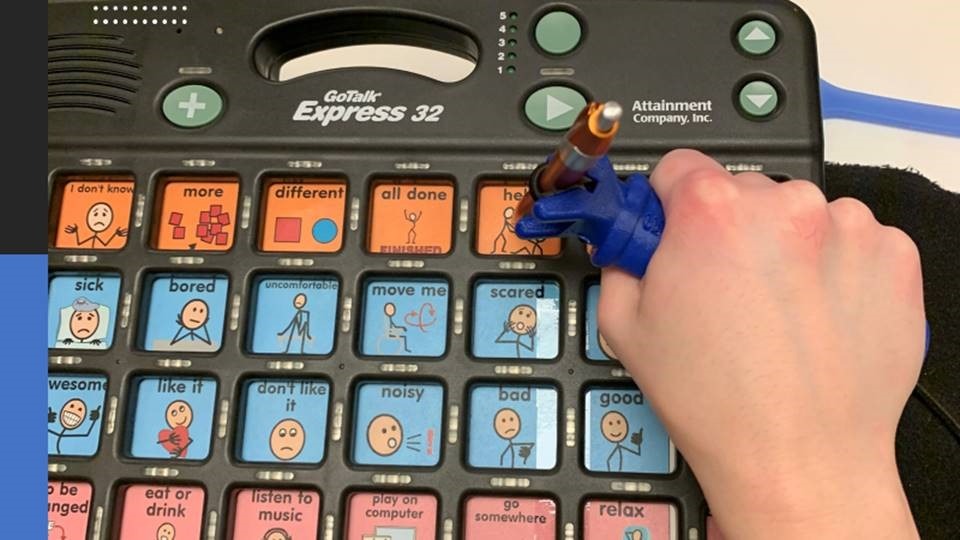
AAC devices can be accessed in many different ways. Eye gaze, switches and scanning are all valuable options for kids whose access needs are best addressed with one of these options. This back-to-school AAC checklist is specifically for families whose child wants to access their device by hand, directly touching or using a stylus on the screen, but whose fine motor skills do not yet fully support the control needed to utilize this option. If your child’s hand grips the stylus for a second and then loses it, or their arm moves involuntarily while they are trying to reach a target on the screen, the device itself is not the problem, direct hand access is. This checklist covers the physical access piece that most back-to-school AAC resources skip, along with the logistics you already know to expect, and where tools like the functionalhand® can make direct access possible.
Why Is Physical Access the Missing Piece in Most AAC Back-to-School Checklists?
Most AAC back-to-school guidance focuses on getting the device charged, available, and loaded with the right vocabulary for the new classroom. That’s a critical first step, but it skips over something occupational and physical therapists flag constantly: physical access. Before a child’s hand can even attempt to hold and aim a stylus, their body needs to be positioned so it can move with control. A stable seat and a device at the right height and angle allow the arm not fighting gravity or an awkward setup just to reach the screen. Once positioning is right, the next question is whether the hand itself can hold and aim the stylus long enough to select a word, especially for kids whose grip fluctuates because of a movement disorder rather than a lack of practice.
You’re not imagining that this gets overlooked. ASHA estimates more than 2 million people in the U.S. use AAC devices to communicate, and many of those kids, especially those with cerebral palsy, autism, or apraxia of speech, are managing a motor difference on top of their communication needs. Getting positioning and hand access right isn’t a footnote, it’s often the difference between a device that stays charged in a backpack and one that actually gets used.
What Should Be On a Back-to-School Checklist for Stylus and Device Access?
Think of this as two layers stacked on top of each other: the physical access piece that lets your child pick up and hold the stylus, and the standard AAC readiness steps most checklists already cover. Both matter, and skipping the first one is usually why a well-charged, well-programmed device still does not get used.
| Item | Why It Helps | Best For |
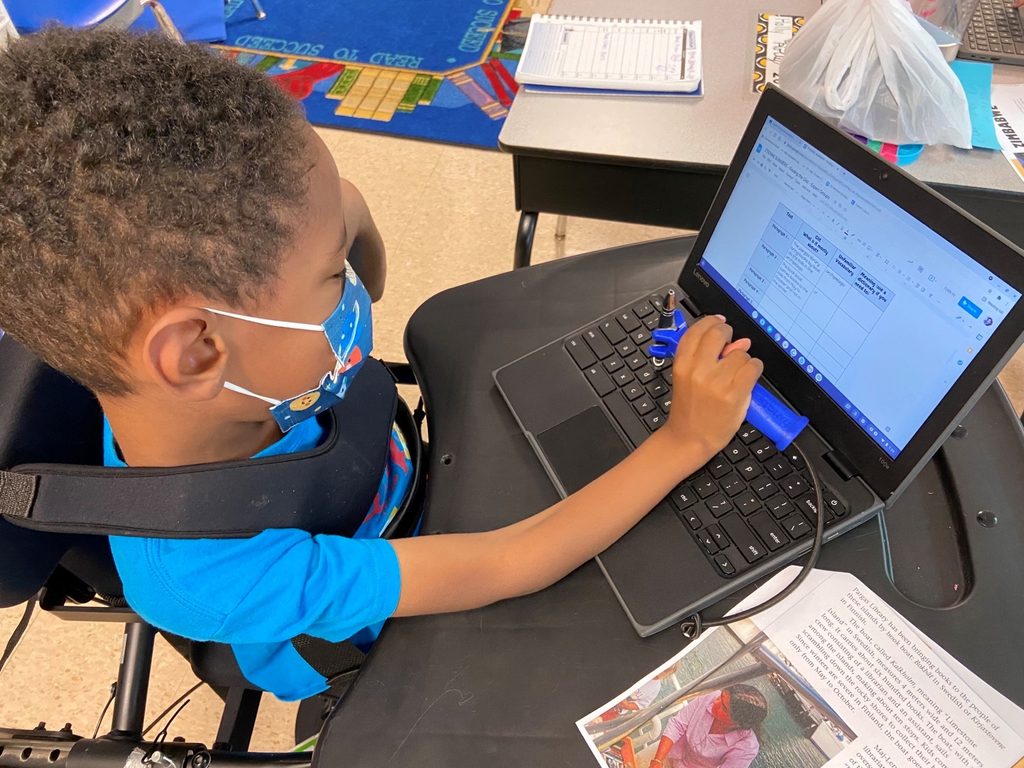
| Adaptive grip aid, such as the functionalhand® | A comfortable, adjustable holder that holds the stylus in place around the hand, so a child does not need to grip and aim at the same time | Kids whose hand cannot maintain a steady grip long enough to reach the target on screen |
| Conductive tape or foil on the stylus tip | Restores the electrical conductivity a capacitive touchscreen needs to register a touch, useful if a stylus is mounted in a way that breaks the contact | Kids using a stylus held inside a grip aid or adapted mount |
| Wrist strap or tether | Keeps the stylus attached to the hand or device so a dropped tool does not end the activity | Kids who lose grip suddenly due to involuntary movement |
| Low-tech backup communication board | Keeps communication possible if the device is uncharged, unavailable, or the stylus is not working that day | Every AAC user, regardless of grip ability |
| Device mount or stand | Holds the tablet or speech device at a stable angle so the child is not also fighting to keep the screen still | Kids who use a wheelchair, stander, or have limited trunk control |
| Charging routine and labeled case | Prevents the single most common back-to-school AAC problem, a device that is not charged or not with the child | Every family heading back to school with a device |
| Pro Tip: If your stylus is mounted inside a grip aid and the screen stops registering touches, check the contact point first. Capacitive touchscreens need an electrical connection between the hand and the tip, and a small strip of conductive tape at that junction usually solves it. |
Should I Focus on Strengthening My Child’s Grip, or on Finding the Right Tool?
For a child who is simply still developing hand strength and coordination, practice helps, and everyday play like squeezing playdough, stringing beads, or using tongs and tweezers builds the same muscles used to hold a stylus steady.
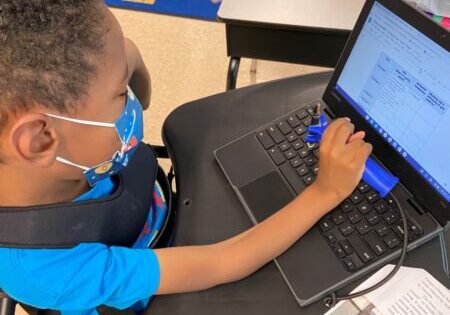
But for a child with a diagnosed motor condition, like cerebral palsy or a coordination disorder, the more useful question is usually not how do we strengthen this, but what tool lets this hand do the job it is already capable of. Positioning is an important first step in successful hand access. Whether the individual is sitting upright or using a slight tilt in their chair or wheelchair, begin by making sure the pelvis is positioned well back in the seat and the trunk is supported in a stable, upright position. Providing support for the upper arm or forearm on a tray or work surface can also create proximal stability, giving the individual greater control of the hand and distal arm for reaching, touching, or selecting on a device. Sometimes improving the body’s foundation can make a meaningful difference in how effectively the hand can be used.
So many tools hold only one item and can do only one thing. [The functionalhand®] is really multifunctional, comfortable, and easy to adjust for whatever you need to put in it that day.— A parent of a functionalhand® user
How Do I Talk to My Child’s SLP or Teacher About Stylus Access?
Most SLPs and teachers welcome specifics rather than general concerns, so come to the conversation with what you have already observed at home. Note how long your child can hold the stylus before losing grip, whether the issue is picking it up, aiming it, or maintaining contact with the screen, and what has helped so far. Ask what backup access methods the classroom already has in place, since many AAC teams keep low-tech boards and spare mounting hardware on hand that families never hear about unless they ask.
If grip challenges are getting in the way of your child using their device consistently, it is reasonable to request an assistive technology evaluation focusing specifically on access methods, not just the device software. This conversation does not have to wait for the school year to start feeling behind. SLPs, occupational therapists, and parents are generally working towards the same goal: making sure the device your child already has actually gets used.
| Pro Tip: Write a short note or email to your child’s SLP or teacher listing exactly what helps at home, for example the grip aid you use and how long your child can hold it comfortably. A specific, one-page reference travels better between home and school than a general description of the challenge. |
Frequently Asked Questions
Why can my child hold a stylus for a few seconds but then lose it?
This is common with movement disorders like dystonia, where muscles involuntarily tighten or release without warning, rather than with a simple strength issue. A grip aid that holds the stylus in place around the hand, instead of relying on the fingers alone to maintain contact, often solves this specific problem more efficiently than practice alone. better than more practice does.
Do I need a special stylus, or can I adapt the one we already have?
Many families adapt an existing stylus rather than buying a specialized one. Capacitive touchscreens need a conductive connection to register a touch, so a strip of conductive tape or foil at the contact point can restore function if a stylus is being held or mounted in a way that interrupts that connection or of a non-conductive material. It is a small, inexpensive fix worth trying before assuming a new device is needed.
What if the school says they will handle stylus and device access?
It is worth asking specifically how, since most school-based AAC support focuses on charging, vocabulary, and device availability rather than the physical grip itself. Sharing your observations and the specific tool that proves successful at home, provides the school team with a starting point and streamlines the accommodation process.
Do I need a separate tool for the stylus, pencils, and everyday utensils?
Not necessarily. A universal cuff style tool, such as the functionalhand®, is built to hold a range of objects, a stylus, a marker, a paintbrush, a fork, in a comfortable, adjustable grip, in the vertical or horizontal orientation so a family is not buying and tracking a separate adapter for every activity. Parents who have tried it often point to exactly that: it is one tool that goes in the backpack instead of several, which saves money, saves space, and means one less thing to remember on a school morning.
Order Your functionalhand® Today
If you’re interested in purchasing a universal cuff for yourself or someone you care about, we hope you’ll consider investing in the functionalhand® universal cuff.
You won’t just be purchasing a product; you’ll be investing in a person’s ability to lead a more independent and fulfilling life.
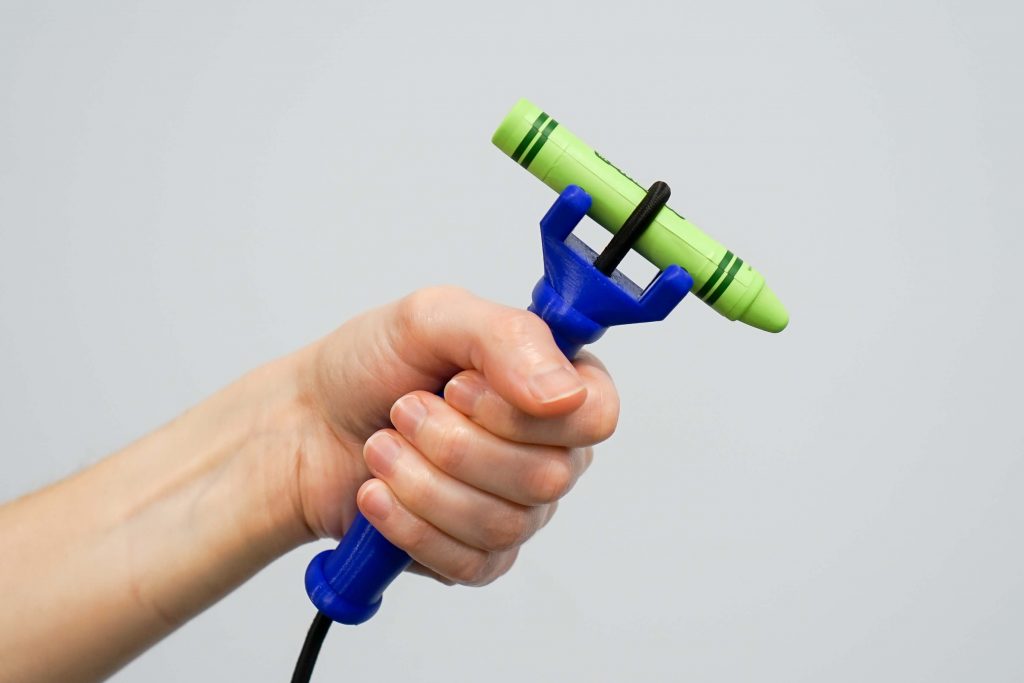
“Just want to say thank you so much for making these! As someone who’s lost a lot of movement in my hands and can no longer write, it’s allowed me to not only write for the first time in ages but also draw! Along with using a knife to spread jam! Thank you so much”